
Role
Product Design Intern
duration
2023 May-Aug
team
Trust, Design Foundation
Overview
Impact
My Design is Live on LinkedIn! 🥳
I designed and launched a keyboard shortcut modal for LinkedIn’s main feed.

The Problem
At the time, LinkedIn did not have a robust or consistent keyboard shortcut experience.
Members who relied on keyboard navigation often had to move through many interactive elements before reaching their intended destination.
For example,
if a user wanted to reach the 'LinkedIn News' section on the right without using a mouse,
They had to tab through every interactive element to focus on the desired section...😓
Design Question
How might we create a more accessible, efficient, and scalable keyboard operability experience across LinkedIn?
3 Connected Solutions
Rather than treating the work as a single modal design, I expanded the project into 3 connected initiatives.
The first two initiatives addressed immediate product needs. The framework extended the work into a longer-term system that could support multiple teams.

1. Keyboard Shortcut Modal
Designed MVP experiences for the keyboard shortcut modal on LinkedIn’s main feed and settings page.
Delivered production-ready designs that were shipped for company-wide testing.
Collaborated with 1 senior engineer, 3 product designers, and 1 content designer.

2. Keyboard Shortcut Repository
Audited LinkedIn’s existing shortcuts and conducted competitive research.
Created a centralized shortcut repository to help Flagship UX and Publishing teams use shortcuts more consistently.

3. Keyboard Operability Framework
Created a keyboard operability framework with principles, interaction guidance, and North Star concepts for future projects.
Conducted user interviews and collaborated with 7 product designers, 1 UX researcher, and 1 engineer.
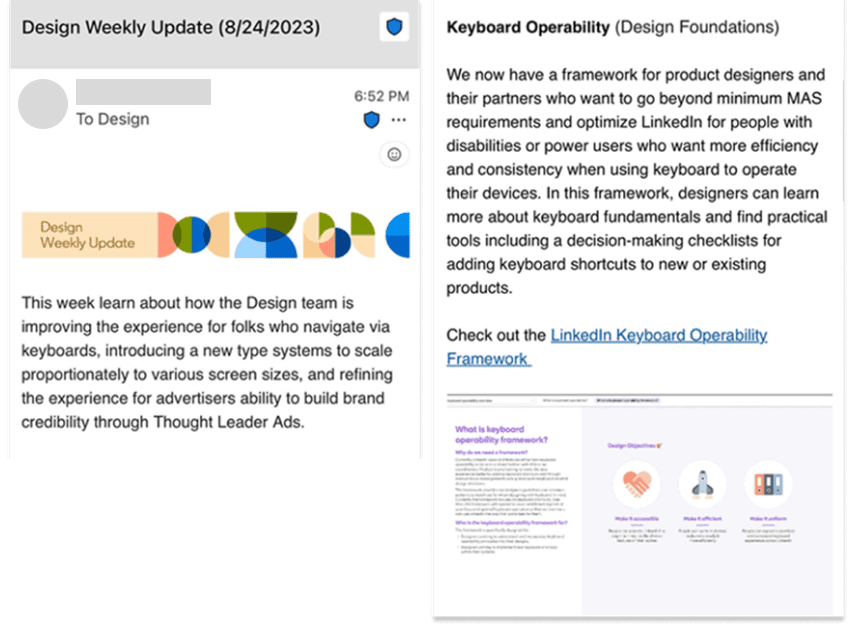
The framework was later used by multiple product teams, including Gaming.
Keyboard Shortcut Modal Design Project
For the first project, I worked with a team focused on adding a shortcut list modal to the feed page.
I created design options, iterated on them, and I provided MVP designs with specifications to the engineers.
I collaborated with 1 senior engineer, 3 product designers, and 1 content designer.
(The second project - Keyboard Shortcut Repository is under NDA🤫)
1. RESEARCH 🔍
LinkedIn shortcut audit
Competitive analysis
2. DESIGN & REVIEW 🖌️
Designing of MVP options
Review with Trust and Design Systems team
3. Content design ✍️
Copy confirmation from Content Design team
4. HAND-OFF 🚀
Delivery of MVP designs with specifications to engineers

During my internship, my design was shipped and tested company-wide.

New Problems Through First Two Project
Throughout the first 2 projects… I observed several problems.
🙅 NO CENTRALIZED TEAM
LinkedIn did not have a centralized team or governance that serves as a guide for keyboard operability.
🤷 LACKS GUIDANCE ON SHORTCUTS
LinkedIn lacks clear guidance or a structured approach when it comes to keyboard operability or shortcuts.
🚧 LIMITED TO MVP DESIGN
LinkedIn had only an MVP design, do not have designs for future features that considers other use cases and pain points of the current design.
So... I’ve decided to design the future of LinkedIn’s keyboard operability!
-> Creating a keyboard operability framework
NEW DESIGN QUESTION
"How might we design and influence LinkedIn's future of Keyboard operability?"
Creating the Keyboard Operability Framework
Before making the framework,
I reached out to the Design Systems team to gather advice on key considerations,
based on their advice I developed the framework's outline.

After creating a draft,
I requested feedback from 6 designers and 1 engineer to improve the format and the content!

Keyboard Operability Framework!
I developed a keyboard operability framework that brought together accessibility principles, a cross-product shortcut audit, a centralized repository, interaction guidance, and recommendations for LinkedIn’s future keyboard experiences

The 25-page framework was organized into four sections: overview, education, practical design guidance, and North Star concepts.
This prototype is one example from the North Star section, exploring how users could customize keyboard shortcuts in LinkedIn settings.
🔒 Detailed designs and internal materials are confidential.
But I’m happy to share additional context during the interview process 😊
Result
After my internship,
I received exciting news 📰 from a LinkedIn designer!
Impact

A scalable foundation for future work
I expanded the project into a centralized repository and framework that helped teams reduce shortcut conflicts, follow shared patterns, and design more consistent keyboard experiences.

A more accessible and efficient experience
I designed and launched a keyboard shortcut modal that made shortcuts easier to discover and helped members navigate LinkedIn without relying on a mouse or trackpad.
Beyond the Project
I’m grateful to have contributed to a meaningful accessibility project, learned from thoughtful collaborators, and built lasting connections along the way.

UP NEXT
Explore another project!
